AusAlert information: keeping yourself safe
Australia is introducing a new emergency alert system that will send messages to compatible devices during emergencies. This will be useful in situations when the government needs to send public information quickly, such as natural disasters, security threats and more.
The AusAlert system will make a device vibrate and sound an alarm for around 10 seconds. For some of the alerts, there will not be an option to opt out.
This change may be worrying for people impacted by domestic and family violence, and people who use safe phones. There are steps you can take to keep yourself safe.
Before the AusAlert system is rolled out in October, the government needs to test it to make sure it works. They will do this in two stages.
Stage 1: Community Testing
What: Priority alert
Where: Coastal townships – Cooya Beach, Newell and Wonga Beach
When: Tuesday 16th June, 2.00pm
First, there will be a priority alert sent to devices in a handful of locations across Australia. In Queensland, this will be in the coastal townships area including Cooya Beach, Newell and Wonga Beach. There will also be community testing in other states. The government has a list of locations for this community testing on their website, along with more information.
This will take place on Tuesday the 16th of June at 2.00pm.
During the priority alert test, all compatible devices in the test region will vibrate and sound an alarm for about 10 seconds. AusAlert has provided information about what it will look like:
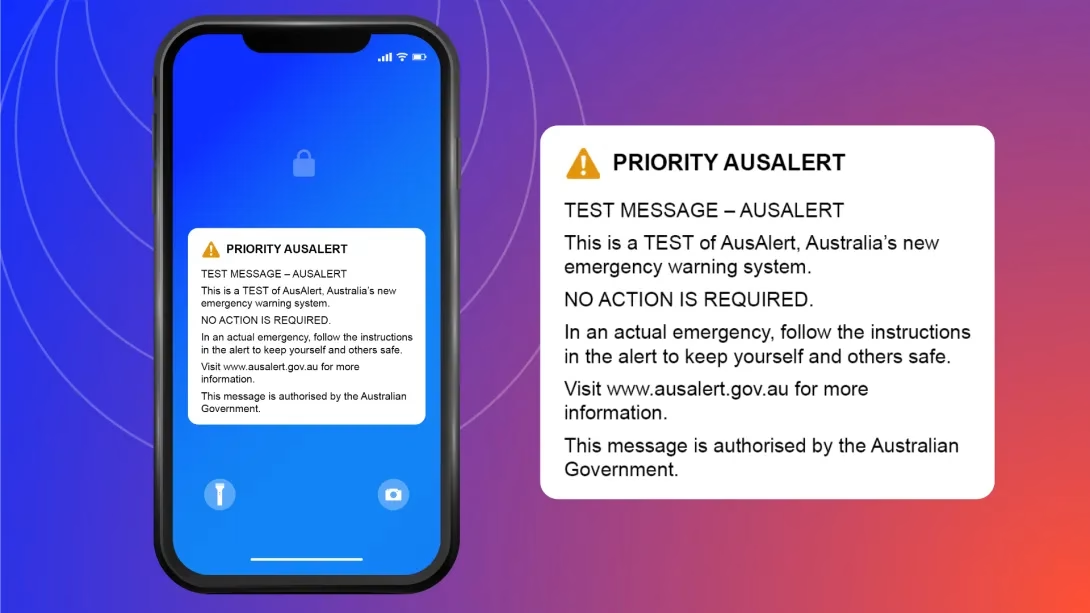
You do not have to do anything else if or when you receive this alert. If you interact with your phone, the alert will go away. You will not need to download anything or provide any extra information. It will be clearly marked as a test.
AusAlert has given advice that this alert will conform to device settings. This means that if your phone is on silent or do not disturb, the alert will not vibrate or make a noise. There should also be an option to turn off the priority alert in your device settings – the AusAlert website explains how to turn alerts off.
However, it is important to note that this is a test. There is always a possibility that tests won’t go the way we expect them to.
If you are worried this test might make you unsafe, your best option will be to turn off your device or put it in aeroplane mode. If you take this option, you should turn it off at least one hour in advance of the test and leave it off for at 24 hours afterwards.
Stage 2: National Test
What: Critical alert
Where: Nationwide across Australia
When: Monday 27th July, 2.00pm (QLD time)
The second test will be a critical alert sent to all compatible devices across Australia. It will not be possible to opt out of critical alerts. There will not be an option to turn these off in device settings, and it will still sound if the device is on silent or do not disturb.
Advice from the Australian Government suggests that the only way to avoid the critical alert is to turn off your device or put it in aeroplane mode. You will need to do this at least an hour before the alert is sent, then leave it off for at least 24 hours afterwards.
The critical alert will be similar to the priority alert – it will vibrate and make a siren-like sound for around 10 seconds.
If you have a safe phone, you should update your safety plan in preparation for this event.
Priority Alert v Critical Alert
There are two types of alerts that will be used through AusAlert – Priority Alerts and Critical Alerts.
Priority alerts will be used when there is a lower level of risk. If you don’t wish to receive these alerts, you have a few options. You can:
- Turn alerts off in your device settings.
- Put your phone on silent / do not disturb. The priority alert will conform to device settings and only play at the volume your phone is set to.
- Keep your phone turned off and/or in aeroplane mode. You will need to do this at least an hour before the alert is sent, and keep it turned off for at least 24 hours afterwards.
Stage 1 (the community tests) will test the priority alerts. However, we recommend turning your phone off or putting it in aeroplane mode, just in case the test does not go as expected.
Critical alerts will be used in situations with higher levels of risk. There is no option to opt out of these alerts. The alert will sound even if your phone is on silent or do not disturb. There is only one way to avoid a critical alert:
- Put your device on aeroplane mode or turn it off completely, at least an hour before the event.
- Leave it off for the duration of the test, and for at least 24 hours afterwards.
Stage 2 (the national test) will test the critical alerts.
Safety Planning
We know that the Australian Government will be testing the AusAlert system on these two occasions – a priority alert for selected communities on Tuesday 16 June, and a critical alert nationwide on Monday 27 July.
This is helpful for information for people who need to make or update a safety plan. We can plan around these two events.
However, after the launch of AusAlerts on October 1st 2026, safety planning may become more complicated. There will not be any warning that an alert is coming, so people will not be able to plan around it.
There are different ways you can opt out of receiving priority alerts. However, it is not possible to opt out of critical alerts. The only way to avoid receiving critical alerts is to have your phone turned off or in aeroplane mode. This may not be practical for everyone. You should take steps to update your own individual safety plan to keep you and your family safe. Some options could include:
- Keeping your safe phone in a location where a person using violence does not know about it, such as your workplace or a neighbours house.
- Keeping your safe phone permanently turned off and only turning it on when you are in an active emergency situation, or a person using violence is not in the house.
- Using a device that isn’t compatible with AusAlerts. An old basic phone (one that can call and text, but doesn’t use a full operating system) may be an option. You will need to check if the specific operating system is eligible to receive AusAlerts. Apple iPads also won’t receive AusAlerts.
Remember to check all your devices to ensure they are in line with your safety plan. This includes phones, but also other smart devices such as tablets and watches.
There are services that can help you make a safety plan that is specific to you, which can help keep you and your family safe. You can reach out to your local domestic violence service for support. Find yours via Ask Izzy.
If you are in Queensland, you can call DVConnect for free and confidential support. If you are at imminent risk and want to leave today, DVConnect Womensline can provide emergency transport and accommodation.
DVConnect Womensline
1800 811 811
Available 24 hours a day, 7 days a week
DVConnect Mensline
1800 600 636
Available 9am – midnight, 7 days a week